A product feed is a structured file or data stream that sends product records and attributes from a source system to a receiving channel. Each record can describe a product or variant through fields such as ID, title, description, link, image, price, availability, brand and product identifiers. The receiving platform validates those values against its own specification before it can list, advertise or otherwise use the item.
A feed is not the product catalogue itself. It is a channel-specific representation of selected catalogue data. An ecommerce business may produce different feeds for Google Merchant Center, marketplaces, social platforms, affiliates or comparison services while maintaining one governed source of product truth.
What is a product feed used for?
Product feeds let a commerce system distribute many product updates without editing every destination record manually. A feed can support:
- shopping results and product listings;
- paid shopping and dynamic product advertising;
- marketplace catalogue imports;
- social-commerce catalogues;
- affiliate and comparison-shopping programmes;
- local inventory or regional availability where the channel supports it;
- internal data transfer between catalogue, commerce and fulfilment systems.
The destination controls which fields are required, accepted values, update methods and policy checks. A file that works for one platform may fail on another because its taxonomy, identifiers, image rules or availability values differ.
Common product feed fields
The exact schema comes from the receiving channel. These are common field groups, not a universal template.
| Field group | Typical values | Why it matters |
|---|---|---|
| Identity | item ID, SKU, GTIN, MPN, brand | Joins updates to the correct product or variant |
| Naming | title, short title, description | Identifies the offer and helps a channel match it to demand |
| Destination | product URL, mobile URL | Sends the user to the canonical purchasable page |
| Media | primary image and additional image URLs | Represents the item visually under channel rules |
| Commerce | price, sale price, currency, availability, condition | Describes the current offer |
| Classification | channel category, product type, labels | Groups products for discovery, policy and campaign use |
| Variant | item group ID, colour, size, material, pattern | Relates purchasable options without merging their values |
| Shipping and tax | weight, dimensions, service or policy references | Supports applicable delivery and cost calculations |
Use a stable item ID. If an ID is changed whenever a title or campaign changes, the destination may treat the record as a new product and lose its history. Do not reuse an old ID for a different product.
The Stock Keeping Unit (SKU) can be an internal identifier, but it is not automatically a global product identifier. Keep the role of SKU, GTIN, MPN and channel item ID explicit.
Product feed formats and delivery methods
Common formats include delimited text such as CSV or TSV, XML, JSON and spreadsheet-based files. Some platforms also accept direct API updates or a connector that transforms source data into the required schema.
Format choice does not determine data quality. A valid XML file can still contain the wrong price. A perfectly structured CSV can still point to a blocked image or a non-canonical URL.
Delivery methods can include:
- manual file upload;
- scheduled fetch from a hosted URL;
- cloud-storage or secure file transfer;
- an ecommerce-platform connection;
- a feed-management platform;
- API-based insert, update and removal.
Choose the method around catalogue size, change frequency, destination requirements, operational ownership and recovery needs. A store with frequent price and stock changes needs a shorter update path than a stable catalogue with few items.
What is a Google product feed?
A Google product feed is product data supplied to Google Merchant Center under Google's product data specification. Merchant Center can receive products through files, supported ecommerce-platform connections, automated sources or APIs, depending on the account and programme.
The official Google Merchant Center product data specification defines attributes, accepted values and requirements. Treat that document as the controlling source for Google-specific fields; do not assume another channel's template is interchangeable.
Merchant Center product data and website structured data are related but separate inputs. A feed can provide frequent catalogue updates across many items. Product structured data describes the product or offer visible on a web page. When the two are both present, identifiers, price, availability, currency and destination URL should describe the same current offer.
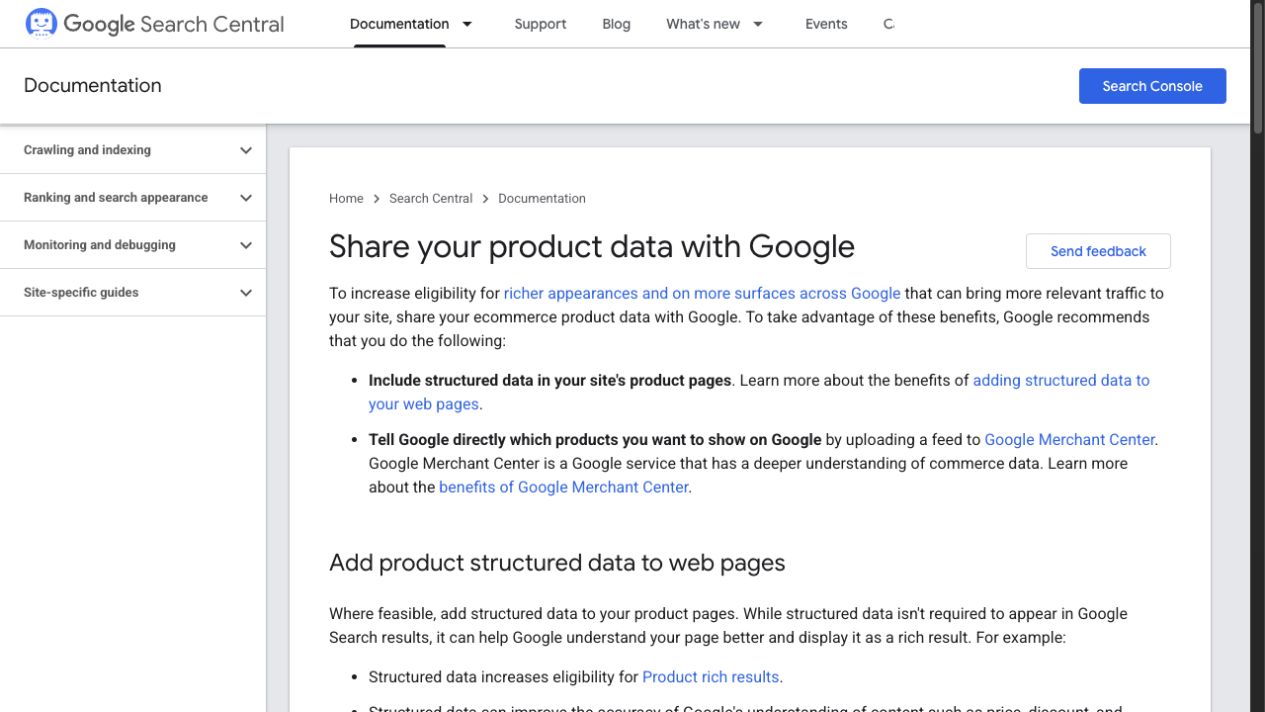
Google documents multiple product-data inputs. The correct method depends on catalogue ownership, update frequency and the destination’s current requirements.
The product-data consistency triangle
An ecommerce product can be represented in three places:
- Storefront: what a customer can see and purchase on the landing page.
- Structured data: machine-readable product and offer facts attached to that page.
- Channel feed: the item and offer values sent to a shopping or marketplace system.
These records do not need identical prose, but their facts cannot contradict one another. Diagnose each field across the triangle:
| Fact | Storefront check | Structured-data check | Feed check |
|---|---|---|---|
| Product identity | Correct product and variant shown | Product/variant identifiers match | Item and group IDs are stable |
| Price | Purchasable price and currency visible | Offer price matches visible value | Submitted price matches the destination page |
| Availability | Customer can buy under the stated status | Availability value reflects the page | Stock status updates within the accepted latency |
| URL | Canonical product or variant destination | URL identifies the same entity | Link resolves to the intended landing page |
| Image | Product is clearly represented | Image belongs to the same product | Image URL is crawlable and policy-compliant |
A mismatch can arise from separate update clocks, caching, a failed connector, market-specific pricing, variant confusion or a manual override. Record the source and timestamp for each value before applying a fix.
Product variants in a feed
Variant products need both family identity and purchasable-option detail. A T-shirt family may share a product concept while each size-colour combination has its own stock, price, URL or image.
Common controls include:
- one stable ID per purchasable variant;
- a shared group ID for variants of the same product family;
- complete differentiating attributes such as size and colour;
- variant-specific availability and price;
- a landing page that selects or clearly exposes the submitted option;
- images that represent the submitted variant when required.
Do not collapse several variants into one record when the channel needs individual offers. Do not create a separate unrelated family for every option when a group relationship is required. The feed should mirror how the catalogue defines the product and its variants.
Product feed management
Product feed management is the recurring process of extracting, transforming, validating, sending and monitoring product data. It is not a one-time export.
Establish a source-of-truth hierarchy
Name the system that owns each field. A PIM may own approved titles and attributes, the commerce platform may own URLs and live prices, and an inventory or fulfilment system may own availability. The feed process needs a deterministic rule when those systems disagree.
Transform for the destination
Map internal values to accepted channel values. Keep transformation logic versioned. If an internal category changes, the rule should show which destination category and product-type fields will change.
Validate before sending
Check required fields, formats, identifiers, URLs, images, price logic, availability values and variant relationships. Separate blocking errors from warnings and optimisation opportunities.
Reconcile after processing
A successful upload does not mean every item was accepted. Record total submitted, processed, approved, limited, rejected and missing items under a stated scope. Investigate changes by error class and affected product group.
Monitor freshness
Define an acceptable lag for each volatile field. Availability and sale price may need more frequent updates than brand or material. Measure source update time, feed generation time, destination processing time and current destination value.
How to diagnose product feed errors
Use an evidence chain instead of repeatedly resubmitting the same file.
- Identify the affected destination, programme, market, account and item ID.
- Record the exact error or warning and its first-seen time.
- Inspect the submitted value and the source-system value.
- Compare the destination URL and visible product state.
- Check structured data where the issue concerns an overlapping field.
- Review mapping, transformation and recent catalogue changes.
- correct the authoritative source or rule rather than patching only one exported row.
- Resubmit or wait for the documented processing cycle, then verify the item status.
Common failure groups include missing identifiers, invalid values, price mismatch, availability mismatch, inaccessible landing pages, blocked or weak images, broken URLs, unsupported categories and variant inconsistencies.
How product feeds connect to SEO
A product feed is not a replacement for ecommerce SEO. It supports product discovery surfaces and can expose data problems that also affect organic landing pages.
- Titles and product types reveal whether catalogue naming is controlled.
- Destination URLs expose canonical, redirect and variant-selection errors.
- Price and availability conflicts reveal stale storefront or structured-data values.
- Image URLs expose inaccessible, generic or mismatched media.
- Item diagnostics help prioritise product groups with repeated data failures.
- Feed labels can support operational analysis, but they do not create organic category-page relevance by themselves.
Search pages still need useful category architecture, indexable internal links, accurate product content and technically accessible destinations. The feed should transport governed product facts, not compensate for an incoherent catalogue.
Product feed questions
Is a product feed the same as a sitemap?
No. A sitemap lists URLs and associated crawl information. A product feed sends structured product and offer attributes to a receiving channel under that channel's rules.
Is a product feed the same as Product schema?
No. Product structured data is attached to a web page. A feed is submitted or transferred to a destination system. Their overlapping facts should remain consistent.
How often should a product feed update?
Update frequency should reflect how quickly the underlying facts change and how the destination processes them. Define acceptable latency separately for availability, price, promotions and more stable attributes.
Can one feed be used for every channel?
A governed base dataset can support several channels, but each destination can require different fields, accepted values and policies. Produce channel-specific outputs from the shared source rather than forcing one unmanaged file everywhere.
Who should own product feed quality?
Assign field ownership across catalogue, merchandising, engineering, inventory, marketing and operations. One named feed owner should coordinate validation and incident resolution, but that person cannot repair ungoverned source data alone.
Build a feed that can be audited
For every output, record the source systems, transformation version, destination, market, generated time, item count and processing result. Keep stable identifiers. Reconcile volatile facts against the storefront. Monitor errors by product group and cause. That creates a product-data operation, not merely a file upload.
Related ecommerce terms
- Stock Keeping Unit (SKU) explains internal catalogue identity.
- Third-Party Logistics (3PL) shows how fulfilment data returns to the catalogue.
- Gross Merchandise Value is a commerce metric, not a feed-quality measure.
- Browse the ecommerce glossary for more controlled definitions.
Reviewed: 26 August 2026
Next accuracy review: 26 September 2026 Deep source recertification: 23 November 2026