
WooCommerce SEO is the work of making a WordPress store's useful category and product pages crawlable, understandable and commercially accurate. The result is controlled by WordPress core, WooCommerce, the active theme, extensions, hosting and measurement systems. Start by identifying which layer owns the output, then verify the rendered store rather than trusting one plugin screen.
This guide gives Indian store owners and marketing teams a safe order of operations. It does not declare one plugin, theme or hosting company the universal answer. Those choices belong to the store's current stack, catalogue and operating constraints.
Start with the WooCommerce output-owner map
WooCommerce is a commerce plugin for WordPress. It stores products, categories, attributes, prices and inventory states. The active WordPress theme or block templates decide how much of that information reaches the page. SEO and commerce extensions can add metadata, schema, redirects or feeds. Hosting determines how the application is delivered. Search Console and analytics show what happened after release.
| Output owner | What it can control | What to inspect | Typical failure |
|---|---|---|---|
| WordPress core | search visibility, permalinks, content types | settings, responses and rendered HTML | launch remains discouraged or URLs change without a map |
| WooCommerce core | products, categories, attributes and product states | catalogue records and representative routes | weak taxonomy or conflicting inventory states |
| Theme and blocks | navigation, headings, templates and visible product facts | mobile and desktop storefront | correct admin data never reaches crawlable HTML |
| Extensions | metadata, schema, redirects, feeds and caching | rendered source, feed output and extension ownership | two extensions emit competing instructions |
| Hosting and infrastructure | response time, cache, media and database delivery | field data, headers and diagnostic traces | one lab score hides a slow template or broken buying path |
| Measurement systems | discovery, indexing, queries, landing pages and orders | Search Console and analytics definitions | blended reporting hides the affected page group |
Use one owner for each output. If a theme and two plugins can all write Product structured data, decide which one remains responsible before editing fields. The same rule applies to titles, canonicals, sitemaps, redirects and image processing.
Record the baseline before changing WooCommerce SEO settings
Begin with access and evidence. You need an administrator who can review WordPress and WooCommerce settings, a safe release method, current backups, and a way to compare the live store before and after a change. A staging site helps, but it does not replace production verification because hosting, cache, consent tools and payment scripts can behave differently.
Save representative URLs for:
- the homepage and one blog post;
- one parent category and one child category;
- one simple product and one variable product;
- one in-stock, one temporarily unavailable and one discontinued product state;
- one useful filter and one filter combination that should remain a browsing state;
- cart, checkout, account, search and policy pages.
For each URL, record the response, index instruction, canonical, title, H1, internal links and structured data. Capture the mobile page and note which theme, plugins and release version produced it. The ecommerce SEO checklist provides a cross-platform release record when the change affects more than WooCommerce.
Check WordPress search visibility before diagnosing rankings
In WordPress, open Settings > Reading and review Search Engine Visibility. WordPress documents this setting as a request to discourage search engines from indexing the site. It is not a guarantee that every search system will comply, and clearing it does not guarantee indexing.
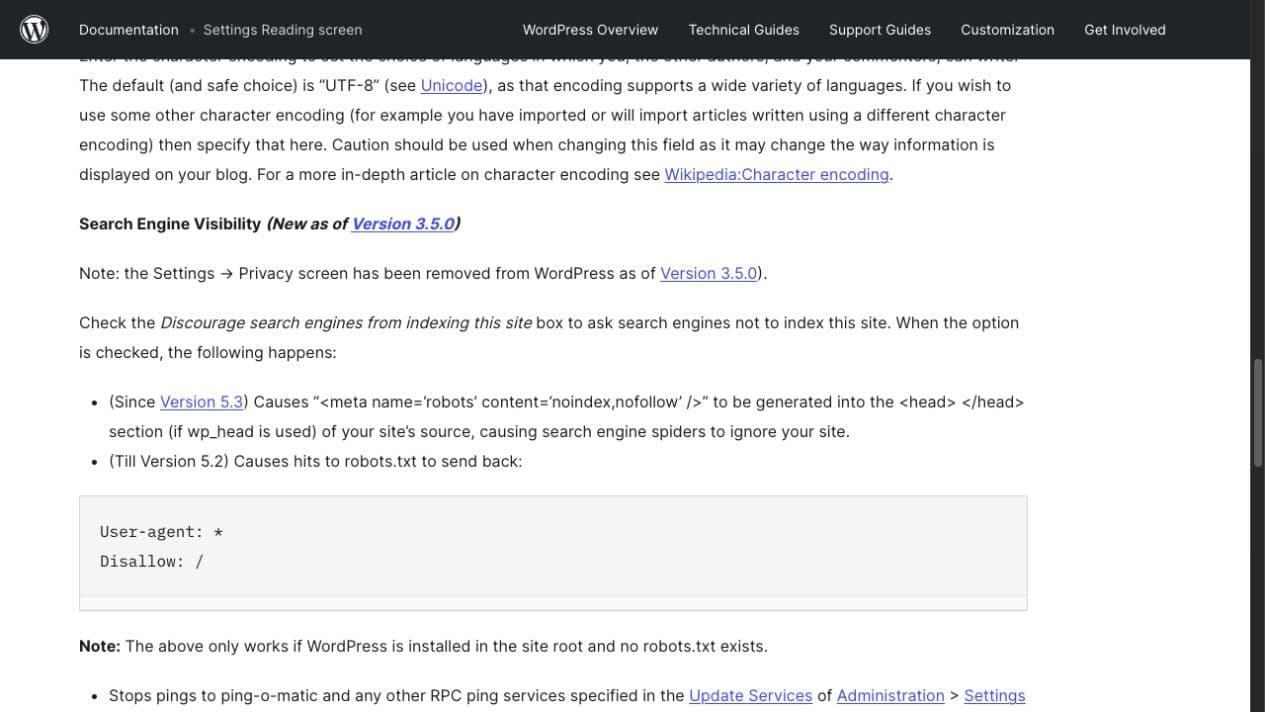
This setting is a launch gate, not a growth tactic. After changing it, inspect the rendered robots directive on representative pages, check the response and confirm that the store is still reachable without authentication. Then request inspection for a small sample in Search Console. Do not submit thousands of URLs merely because one site-wide control changed.
Also check whether a maintenance plugin, staging header, hosting control or SEO extension emits a separate noindex instruction. The WordPress checkbox is only one possible owner.
Treat WooCommerce permalinks as a migration decision
WordPress controls the general permalink model. WooCommerce adds product and taxonomy permalink options. On a new store, choose a stable convention before products earn links or search history. On an existing store, changing a base is a migration because every affected address can change.
WooCommerce documents product permalink choices under Settings > Permalinks. A live store may also have custom rewrite rules, multilingual extensions or redirects that alter the final URL.
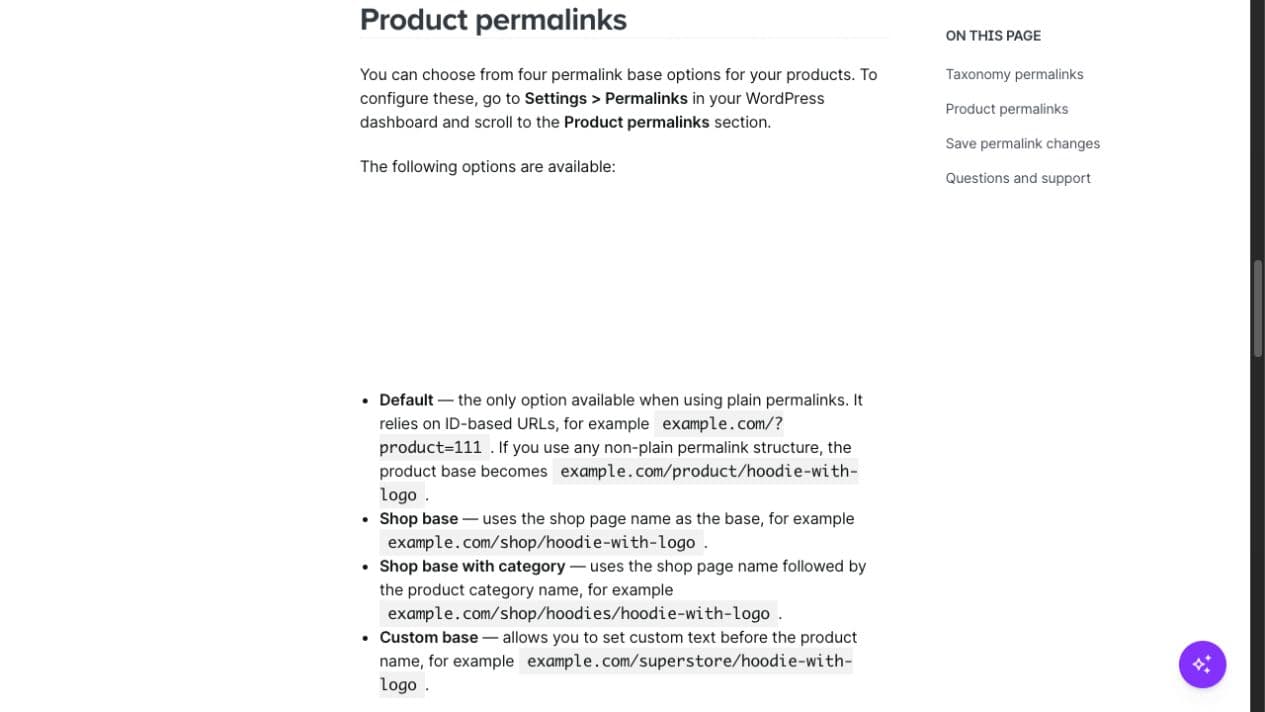
Before a permalink change:
- Export every affected category, product and content URL.
- Map each valuable old URL to its closest valid new owner.
- Test the redirects without chains or loops.
- Update navigation, breadcrumbs, product grids, editorial links and XML sitemaps.
- Release one controlled group when possible.
- Crawl old and new addresses after release, then watch Search Console by page group.
Do not change URLs merely to insert an extra keyword. A readable but imperfect path with history may be safer than a cleaner address introduced without a migration plan. The technical ecommerce SEO guide owns broader response, canonical and migration controls.
Build categories and attributes around catalogue decisions
WooCommerce distinguishes product categories, tags and attributes. They are not interchangeable labels.
- Categories organize products into maintained sets and can form parent-child relationships.
- Attributes describe product properties such as size, colour, material or capacity and may power variations or filters.
- Tags are flexible labels, but a tag archive should not become an indexable page merely because the field exists.
Open Products > Categories and identify the commercial decision each category owns. A category page needs an eligible product set, a useful name, a stable purpose and crawlable internal links. Its copy should explain what belongs in the set and help a shopper compare meaningful differences. It should not repeat the same paragraph across every archive.
Use the ecommerce keyword research process to map verified India demand to one canonical owner. Then check that the store navigation and breadcrumbs point to that owner consistently.
For attributes and filters, start with browsing value. Create an indexable landing page only when the combination has distinct demand, stable product eligibility and enough decision support to maintain. Google warns that faceted navigation can generate very large URL spaces. A universal rule to index or noindex every WooCommerce filter ignores the catalogue and the implementation.
Inspect the actual filter URLs, internal links, canonicals and responses produced by the active theme and extensions. A control shown in an SEO plugin does not prove how JavaScript filters or server-generated archives behave.
Make WooCommerce product pages reliable records
A WooCommerce product page is a commercial entity record, not just a description field. The page should identify the item, current offer and reasons it fits a buyer's decision.
Check the values held in Products > All Products and any product-data extension. Depending on the category, useful fields can include:
- product name, brand, model, SKU, GTIN or MPN where valid;
- price, currency, tax presentation and availability;
- variation relationships for size, shade, pack or capacity;
- material, ingredients, dimensions or compatibility;
- images and alternative text that describe the pictured item;
- delivery, return, warranty, care or safety information;
- evidence and limits for material product claims.
Then compare those records with the live mobile page. A variable product should not show a selected variant's price or availability in one surface while structured data describes another. An unavailable item needs a business decision based on replacement stock, demand, links and customer value. Do not apply one redirect or deletion rule to every product state.
The product page SEO guide covers platform-neutral decision content. This page remains focused on where WooCommerce stores and renders the information.
Reconcile visible facts, Product schema and feeds
WooCommerce themes and extensions can emit Product structured data. Google documents Product structured data for information such as offers, availability and product identifiers. Correct markup can support eligibility for product search experiences, but it does not guarantee display.
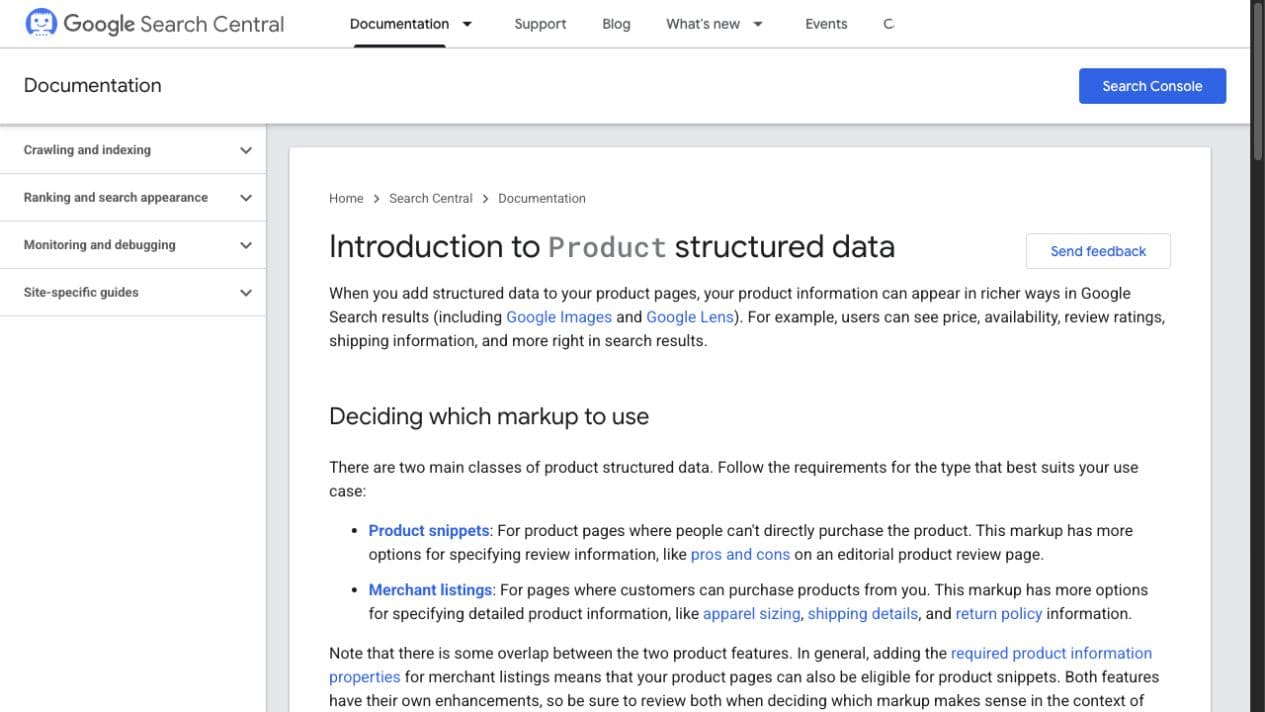
Choose one structured-data owner. Test a simple product, a variable product, a discounted offer, an unavailable item and a product without reviews. Compare the rendered JSON-LD with visible content for the same URL. Do not mark up a rating, price or availability that a customer cannot verify on the page.
Google also treats structured data and Merchant Center feeds as complementary sources. If the store sends a feed, compare name, URL, price, currency, availability, identifiers and variant relationships across WooCommerce, the visible page, JSON-LD and the feed. Fix the source of the conflict rather than patching each destination separately.
Our ecommerce schema markup guide explains the entity-level validation beyond WooCommerce configuration.
Diagnose performance by template and release
WooCommerce performance depends on hosting, the WordPress theme, extensions, database work, images, cache rules and third-party scripts. A platform label cannot predict the result.
Review Core Web Vitals field data when it is available, separated by product, category and content templates. Use lab traces to diagnose main-thread work, image delivery, layout movement or slow server responses. A lab score is not a substitute for customer field data.
When testing a speed change, verify more than the landing page:
- category filters and pagination;
- product variants and image galleries;
- add to cart and mini-cart state;
- coupons, shipping estimates and checkout;
- consent, payment and analytics events;
- cache behavior for signed-in and signed-out users.
A caching rule that makes one test page faster but serves stale prices or breaks cart state is not an acceptable release. Name the infrastructure owner and preserve a rollback path. The WooCommerce theme guide owns theme selection; this guide owns how to verify the active storefront.
Connect supporting content to the catalogue
WordPress gives WooCommerce stores a strong editorial system, but publishing more posts does not repair missing category owners or weak product facts. Build supporting content for questions a product grid cannot answer cleanly, such as sizing, compatibility, care, comparison criteria or category education.
Assign each guide a clear relationship to a commercial owner. Link from the guide to the relevant category or products, then add a useful route back when it helps the shopper. Avoid creating several near-identical articles for keyword variations that resolve the same decision.
Plugin comparisons belong in the WooCommerce SEO plugins guide. Keeping that intent separate lets this page explain the operating system without becoming an unverified plugin list.
Apply India and D2C checks to WooCommerce product truth
Indian WooCommerce stores may need to represent GST-inclusive prices, pack size, pin-code serviceability, cash on delivery, UPI or other payment methods, delivery windows, return terms and marketplace relationships. Publish each fact where a customer needs it and where the responsible team can keep it current.
Do not create a city page for every delivery modifier. Use verified India demand and a distinct customer job before assigning a standalone owner. Product and fulfilment facts should remain consistent across the store, schema and feeds.
For a D2C brand, the owned WooCommerce site also needs stable brand evidence. Manufacturing, sourcing, certifications, founder information and claims require an appropriate source and scope. A supplier certificate does not prove every product claim, and one customer review should not become a universal promise.
Measure WooCommerce SEO by page group
Search Console can group performance by query, page, country and device. Build regex or URL-prefix groups for categories, products and editorial pages. Save the filter definition and date range so another person can reproduce the report.
Review four layers:
- Implementation: responses, index instructions, canonicals, links, schema and performance by template.
- Discovery: submitted and indexed URLs, queries, impressions, clicks and affected page groups.
- Shopper behavior: organic landing sessions, product views, add-to-cart events and completed orders under consistent definitions.
- Operations: release time, plugin conflicts, regressions and repeated manual work.
Search Console average position is not a fixed daily rank. Analytics attribution can also change with consent and channel definitions. Annotate releases and avoid turning one metric into a causal claim.
A 30-day WooCommerce SEO implementation sequence
Days 1 to 5: identify owners and preserve the baseline
- List the active theme, SEO extensions, feed tools, redirect owners, cache layers and hosting controls.
- Save representative URLs and rendered evidence.
- Confirm WordPress visibility and production access.
Days 6 to 12: fix page ownership and crawl routes
- Map categories, products, filters and supporting content.
- Repair internal paths to priority owners.
- Reconcile index instructions, canonicals and sitemap membership.
Days 13 to 20: repair product truth
- Sample simple, variable, discounted and unavailable products.
- Align visible facts, Product structured data and feeds.
- Record edge cases that need theme or extension work.
Days 21 to 30: release, measure and document
- Test affected templates and the buying path on mobile.
- Release controlled groups with a rollback path.
- Annotate Search Console and analytics, then save the next review date.
The order can change when the evidence identifies another blocker. A new store may resolve architecture first. An established store with stable URLs may begin with conflicting product data. The point is to follow dependencies, not a universal checklist order.
WooCommerce SEO questions
Is WooCommerce good for SEO?
WooCommerce can support strong organic discovery because WordPress, WooCommerce, themes and extensions provide substantial control. That control also creates maintenance responsibility. Audit the rendered store and its owners rather than treating the platform name as proof of quality.
Do I need a WooCommerce SEO plugin?
Not for every task. WordPress and WooCommerce provide core controls, while a plugin may help manage metadata, schema or sitemaps. Add one only for a defined job, keep one owner per output and verify the rendered result after installation.
Should WooCommerce tags and filters be indexed?
Treat them as browsing states by default. Create an indexable owner only when it has distinct India demand, stable products, useful decision support and maintained internal links. Test the URL behavior produced by the active theme and extensions.
How do I add product schema in WooCommerce?
Identify whether the active theme or an extension already emits Product JSON-LD. Choose one owner, configure valid product fields, then compare the rendered markup with the visible page and any product feed across representative product states.
Can WooCommerce pages appear in AI search?
Accessible pages with clear entities, supported claims, consistent product facts and concise answers can be retrieved or cited by AI systems. No WooCommerce plugin, schema type or content format guarantees a mention, citation, click or sale.
Turn the owner map into a release plan
WooCommerce SEO becomes manageable when every search-facing output has one accountable owner and one verification method. If your store has overlapping plugins, unstable category owners or conflicting product data, our WooCommerce SEO services can turn the diagnosis into a prioritized release plan.