
BigCommerce SEO is the work of making a BigCommerce storefront understandable, accessible and useful for organic product discovery. It covers page ownership, catalogue architecture, product information, rendered metadata, internal links, URLs, redirects, structured data, performance and commercial measurement.
In practical terms, BigCommerce SEO optimization combines keyword research, on-page content, technical search controls, internal linking, mobile user experience and authority around the categories and products the business needs customers to find.
What BigCommerce SEO optimization covers
| Workstream | Practical outcome |
|---|---|
| Keyword research | Match real search intent to one useful page owner |
| On-page optimization | Improve titles, meta descriptions, headings, product descriptions and images in the rendered output |
| Technical SEO | Control crawl paths, canonicals, sitemaps, redirects, duplicate states and structured data |
| Site experience | Help mobile and desktop users browse, compare and buy without avoidable friction |
| Content and links | Build useful guides, internal linking and earned authority around commercial owners |
| Measurement | Connect search rankings and organic traffic to landing pages, products and completed commercial outcomes |
Search-engine optimization is not a one-time settings exercise. The store and its theme keep changing. Catalogue updates arrive beside content changes, while installed scripts add another moving part. BigCommerce SEO therefore needs release ownership, acceptance checks and regular review, not only an initial audit.
The important word is storefront. A hosted Stencil theme can use the same BigCommerce catalogue as a headless frontend while producing very different HTML and navigation. URLs, canonical tags, schema and performance can differ too. Start by identifying what shoppers and crawlers receive. Do not begin with a generic list of platform settings.
First, identify your BigCommerce storefront architecture
Ask the development owner which storefront serves the public site, which channel and domain it uses, where templates and metadata are controlled, and how a catalogue change reaches production.
| Storefront model | Where search output is usually controlled | First SEO verification |
|---|---|---|
| Stencil | BigCommerce catalogue plus the active Stencil theme and Page Builder configuration | Inspect the active theme, rendered HTML and theme customisations |
| BigCommerce headless framework | BigCommerce catalogue plus its content layer and channel configuration | Verify server-rendered output, metadata, locale behaviour and product URLs |
| Custom headless | BigCommerce APIs plus a separately built frontend and deployment system | Trace every SEO field from catalogue or CMS source to the rendered page |
The labels do not determine quality. A carefully maintained Stencil store can be easier to operate than a poorly governed headless build. Headless architecture creates control, but it also makes the team responsible for output the hosted platform might otherwise supply.
Trace the BigCommerce data path
For Stencil, follow a sample product from the catalogue into the active theme context and its Handlebars templates. Check which product template is called, whether a custom template association changes the route, which partial renders the visible information, and which component emits Product structured data. Review Page Builder regions and Script Manager additions separately because they can change content or load behaviour without editing the main template.
The current default Stencil theme source calls a dedicated product-schema component from the product page and includes a separate breadcrumb component. That gives a useful comparison point for a theme derived from it, but the live theme version and custom code remain authoritative. Record the theme and commit or package used at the time of the audit.
For BigCommerce's headless storefront framework, trace the channel and locale alongside the content layer and catalogue. Confirm which product and category fields come through the Storefront GraphQL API. Then identify where page titles and meta descriptions are composed, how the frontend renders them, and how product options affect the URL. BigCommerce documents that custom code can create variant-specific URLs; they are not an automatic property of every headless store.
For a custom headless build, create a field-owner matrix. Name the source for title, description, canonical, robots, Open Graph data, product facts, navigation, schema and sitemap inclusion. Then name the component or service that renders each value and the deployment that publishes it. An API response containing a correct product title does not prove that the frontend exposes a crawlable, canonical product page.
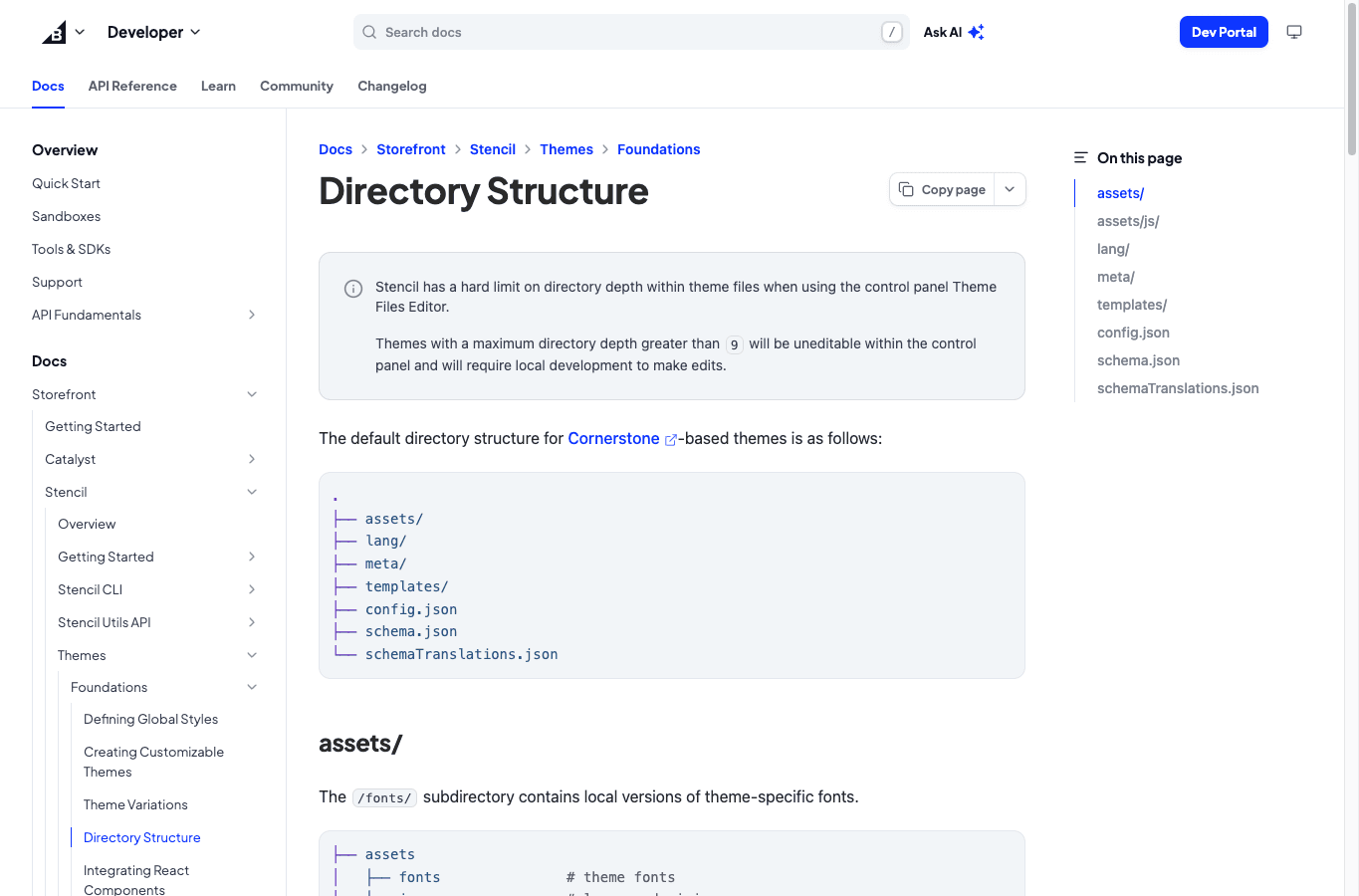
For a Stencil store, record the active theme version and any child or custom changes. Add the Page Builder regions, installed scripts and release process to the same record. BigCommerce documents separate theme areas for templates and assets, plus settings. That structure tells you where to look; it does not tell you whether the live implementation is correct.
Audit rendered output before editing fields
Control-panel values are inputs. Search systems and customers receive the rendered page. Build the audit around page samples from each template:
- homepage and major navigation paths;
- top-level and nested categories;
- products with and without variants;
- brand pages, if they have a useful discovery job;
- buying guides and editorial pages;
- filtered or sorted states, pagination and internal search;
- discontinued products, changed URLs and redirected pages;
- locale or channel variants where applicable.
For every sample, check the response and final URL. Review indexability and the canonical target. Then inspect the title, meta description and primary heading alongside visible product information. Finish with internal links, structured data and images before testing the mobile rendering. Compare source values with the final output. If a field exists in BigCommerce but is absent, duplicated or overwritten in HTML, the implementation layer is the immediate problem, not the keyword.
Create one accountable owner for each layer: merchandising handles taxonomy and product facts; content handles decision support; development owns templates and rendering as well as releases; analytics owns definitions and measurement. BigCommerce SEO stalls when every team can change part of the system but nobody owns the completed page.
Map BigCommerce search jobs to storefront surfaces
Build a route-and-template inventory before assigning keywords.
| BigCommerce surface | Search job to verify | Implementation risk |
|---|---|---|
| Category route and template | Browse one coherent product family | Overlap with nested categories, collections or filtered states |
| Product route and template | Evaluate one purchasable item and its options | Variant state, stock, price or schema can disagree |
| Brand route | Browse a meaningful brand assortment | Thin output when the theme provides little context |
| Web page or blog template | Resolve buying questions outside the catalogue | Editorial content can drift into a category's commercial job |
| Filter, sort or search state | Narrow the current catalogue | Parameter combinations can multiply duplicate outputs |
| Channel or locale route | Serve a defined market and language | Canonical and locale rules can point product availability to the wrong version |
If two surfaces satisfy the same search job, choose one maintained destination and change the other surface's index, canonical or linking behaviour accordingly. Apply the conceptual ownership model from the ecommerce SEO strategy to these actual BigCommerce outputs.
Turn keyword research into rendered on-page signals
BigCommerce SEO optimisation still needs keyword research and accurate page titles. Meta descriptions and headings must match the owner too. Useful content should support that same page job. Images and internal links should do the same instead of being applied from a disconnected keyword list.
Group keywords by the decision behind the search. A commercial product-family query can support a category page. A model, SKU or exact item query belongs with the product. Put a comparison or usage question in a guide when that format resolves the decision, then link it to the relevant category and products. Check the live India search results before assigning the owner because similar phrases can carry different intent.
For each priority page:
- write a specific title that identifies the product set or item without repeating empty modifiers;
- use the meta description to explain the page's value and current offer accurately;
- keep one clear primary heading aligned with the visible page purpose;
- add useful descriptions and specifications, supported by product images and accurate alternative text;
- use internal links to connect parents, children, related decisions and supporting guides;
- review the mobile user experience because filters and tables can behave differently on a small screen, especially beside long product details;
- confirm that the final HTML contains the intended title, description, heading, canonical and links.
Measure rankings and organic traffic only after confirming that the right page appears for the right query group. A higher average position for an unintended URL can signal cannibalisation rather than successful optimisation. Search-engine visibility is useful when it leads customers into a reliable catalogue and decision path.
Build category pages around assortment and choice
A BigCommerce category page has two jobs: expose a coherent product set and help a shopper choose within it. Its title and description matter, but they cannot rescue an unstable or meaningless assortment.
For each important category, define:
- Name the customer decision the category owns.
- List products that are eligible and available.
- Record attributes that explain meaningful differences.
- Choose subcategories or related categories that deserve links.
- Supply the information needed before a product click.
- Set a rule for empty, thin or seasonal states.
Write category copy to resolve the decision, not to hit a universal word count. A compact size guide, material comparison or compatibility note can be more valuable than several paragraphs of repeated keywords. Keep the product grid accessible and make explanatory content usable on mobile.
Do not create a permanent indexable collection for every campaign. A sale, influencer collaboration or temporary assortment can remain a merchandising page. Promote it to an organic owner only when the underlying demand, inventory logic and internal-link path will remain useful after the campaign ends.
The deeper category page SEO guide covers category-specific content and internal-link decisions.
Make product pages reliable evidence surfaces
Product SEO begins with a stable identity. A product page should make it easy to determine what the item is, which variant is selected, what it costs, whether it is available, and whether it fits the shopper's need.
Useful fields depend on the category. They can include brand and model, a valid SKU or GTIN, dimensions, material or ingredients, pack size, shade and compatibility. Usage and care information can sit beside the product's origin. Add warranty and delivery terms where relevant, along with the return conditions. Claims need an evidence owner. A product description should not turn a supplier statement, founder story or isolated review into a universal promise.
Variants need an explicit policy. Determine whether options change the URL and content, then check price, image and availability. Test whether a specific selection can be linked. Separate variant pages make sense only when they would provide a genuinely distinct search result. BigCommerce's headless documentation notes that variant-specific URLs can be implemented, but they are not automatic. The correct answer therefore comes from the live storefront, not from a platform-wide assumption.
Keep visible product facts aligned with the commerce source, structured data and any product feeds. A stale price, mismatched availability or incorrect variant identity is both a search-quality and customer-experience problem.
Use the product page SEO guide when the main constraint is product evidence or decision content.
Treat filters as browsing states until they earn a page
Faceted navigation helps customers narrow large catalogues. It can also create many combinations of parameters, paths or states that repeat the same product set with small variations.
Inventory the behaviour by applying filters in a real browser and recording:
- the generated URL;
- whether ordinary links expose the state;
- its status, robots instruction and canonical;
- whether multiple parameter orders produce the same set;
- whether the state appears in internal search or the sitemap;
- the number and stability of eligible products;
- whether verified India demand supports a distinct decision.
Keep a filter as a browsing state when it lacks a stable customer job. Create an indexable owner only when the combination has distinct demand, useful inventory, unique decision support and a maintained internal-link path. The owner can be a governed category or collection rather than a raw parameter URL.
This policy is more durable than a blanket rule to block or index all filters. It ties crawl and index behaviour to catalogue meaning.
Govern titles, descriptions, URLs and redirects as one release
Metadata should express the page owner's job. Write titles and descriptions from the category or product definition, then verify the final HTML for duplication, truncation patterns and template overrides. Avoid inserting repetitive brand or category strings simply because a field is available.
URL changes carry more risk than metadata changes. Before renaming products, categories or paths:
- export the current URL inventory;
- identify indexed, linked, trafficked and revenue-bearing destinations;
- map each old URL to the closest valid new owner;
- implement redirects in the correct channel or site scope;
- test a sample and then the complete map;
- remove chains and loops;
- update internal links, canonicals and sitemaps;
- monitor old and new URLs after release.
BigCommerce documents redirect operations and import/export workflows, but the store team still has to create the correct mapping. Do not redirect discontinued products to an unrelated category merely to avoid a 404. A useful successor can receive the redirect; otherwise provide an honest unavailable state and relevant alternatives.
For migrations, retain a frozen before-state: URL export, redirect map, sitemap, canonical sample, structured-data sample, crawl summary and performance baseline. Without it, the team cannot distinguish a planned change from an accidental loss.
Validate structured data in the active theme
The current default BigCommerce theme source includes Product JSON-LD on product templates and BreadcrumbList JSON-LD in breadcrumb templates. That is evidence about the source theme, not proof that every BigCommerce store emits complete or valid structured data.
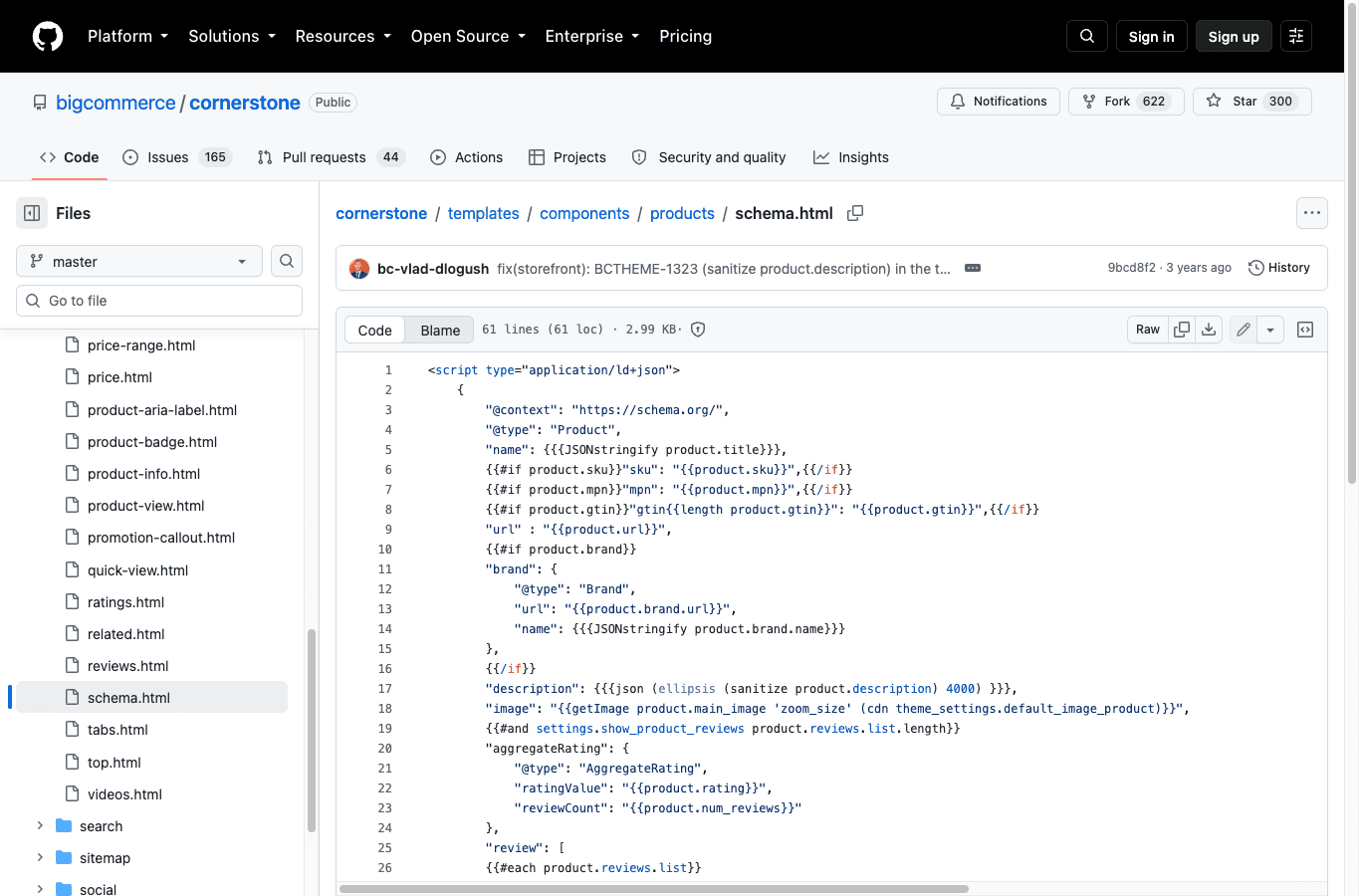
The active theme may be old, customised or replaced. An app can add a second entity. A headless frontend can omit fields or generate different markup. Product options can change availability and price without the structured data updating correctly.
Test representative live pages. Compare visible name, image, brand, identifier, price, currency, availability, condition and review information with the structured data. Remove duplicate or contradictory Product entities. Use review and rating fields only when the visible content and Google's eligibility rules support them.
Structured data helps systems interpret an eligible page. It does not guarantee a rich result, ranking, AI citation, click or sale.
Diagnose performance by storefront surface and real-user data
BigCommerce's infrastructure and CDN-related features are inputs to delivery. They do not prove that the active storefront performs well for real users. Theme bundles, fonts, hero media, third-party apps, consent tools, reviews, recommendations, personalisation and tag managers can change the result.
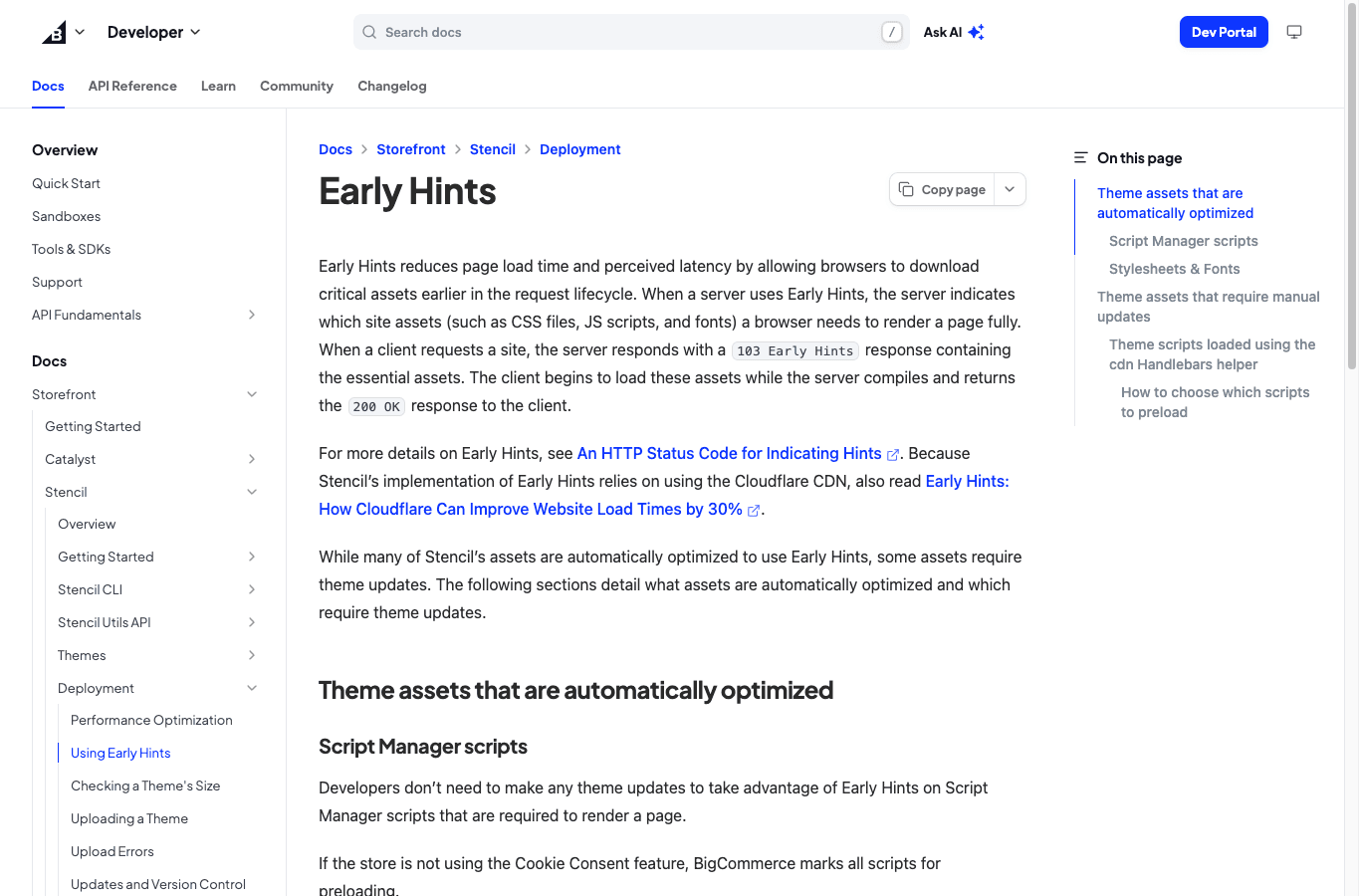
BigCommerce's Stencil Early Hints documentation makes an important distinction. Some assets can be handled automatically, while theme scripts can require explicit developer updates. Performance ownership therefore crosses the platform and the implementation.
Segment diagnostics by page template and device. Use field data where available, then reproduce representative pages in a controlled test. Connect each slow resource or long task to an owner and business purpose. Do not remove measurement or conversion functionality blindly; load it deliberately, reduce duplication and test the commercial effect.
A release is complete only when critical storefront paths still work. Test navigation and search, then product selection and the cart. Complete a checkout handoff and confirm that consent plus analytics still work. A faster page that breaks purchasing is not an SEO win.
Measure the BigCommerce implementation, not one blended channel
Group reporting by storefront template and release. Keep Stencil category and product routes separate from headless category and product routes, or use the equivalent groups for a custom frontend. Search Console shows query and landing-page visibility. Analytics reports sessions and events under its attribution model. BigCommerce and downstream order systems hold product and transaction outcomes. Keep these definitions separate until their dates and identifiers align.
An Indian store may also need accurate price and tax presentation, pack size, pin-code availability, cash on delivery, delivery time, returns and warranty information. Put each fact in the relevant product, category, policy or fulfilment experience. Do not turn every city or delivery modifier into a page.
Supporting guides should resolve questions the storefront templates cannot answer cleanly. Examples include use and care, sizing, compatibility and comparison criteria. Link each guide back to the relevant commercial owner. Apps can help find broken links or missing descriptions and schema errors, but they cannot choose the taxonomy or prove a claim.
The same accessible HTML, explicit relationships, consistent product facts and supported claims can help traditional and AI retrieval. Track AI observations separately; no BigCommerce setting or schema type guarantees a mention, citation, click or sale.
BigCommerce release acceptance checks
For every theme, catalogue, URL or frontend release, verify the affected page samples before and after deployment:
- the intended channel and domain return the correct final URL and status;
- titles, descriptions, headings and canonicals come from the expected source;
- category navigation and product links remain crawlable;
- selected variants keep accurate price, image and availability states;
- filter, sort and pagination URLs follow the agreed index policy;
- old addresses resolve through one redirect to the valid owner;
- Product and BreadcrumbList entities match visible information;
- critical theme assets and third-party scripts load without breaking mobile use;
- cart and checkout handoff still work, with consent and analytics intact;
- the release annotation names affected templates and measurement dates.
Use the broader ecommerce SEO checklist for checks that are not specific to a BigCommerce storefront.
BigCommerce SEO questions
Is BigCommerce good for SEO?
BigCommerce provides catalogue and storefront capabilities, backed by APIs that can support organic search. The result depends on architecture and implementation. Audit the active Stencil or headless storefront rather than treating the platform name as proof of SEO quality.
Does BigCommerce add product schema automatically?
The current default theme source includes Product JSON-LD, but a live store can use another theme, an older or modified version, an app or a headless frontend. Validate representative rendered product pages and the visible facts before relying on the markup.
How should BigCommerce filters be handled for SEO?
Treat filters as browsing states by default. Create an indexable owner only when a combination has verified demand, stable product eligibility, unique decision support and maintained internal links. Test the live URL, canonical and crawl behaviour rather than assuming one platform-wide pattern.
What should be checked before changing BigCommerce URLs?
Export current URLs, map each valuable old address to the closest valid owner, implement and test redirects, remove chains, update internal links and sitemaps, then monitor both old and new URLs after release.
Is headless BigCommerce better for SEO?
Headless architecture provides more implementation control, not an automatic SEO advantage. The team becomes responsible for rendering, metadata, canonicals, structured data, navigation, sitemaps, performance and release reliability. Choose it for product and engineering reasons that justify that ownership.
Can BigCommerce content rank in AI search?
Accessible pages with stable entities, consistent product facts, supported claims and useful answer passages can be retrieved or cited by AI systems. No BigCommerce setting, schema type or content format guarantees a mention, citation, click or sale.
If the problem spans catalogue ownership, active-theme output and measurement, contact EcommerceSEO for a BigCommerce storefront review.